Hotel EV Charging: Compatibility, Fees & Backup Plans

TL;DR
Hotel destination chargers fail in ways the property's website doesn't warn you about — connector-type mismatches, guest-access restrictions, network app lockouts, and fees that don't show up until the credit-card statement. Before you book, confirm the charger's connector type and adapter requirements, recent working sessions, guest access rules, all fee categories, and a nearby public-charging backup within your reserve range. Have a confirmed backup path — a suitable authorized outlet, an approved adapter, or a nearby public charger. Visually inspect the connector before you plug in; do not touch damaged cables or contacts.
The five questions to ask before you book
Public-charger listings on booking sites are marketing, not status. The reliable path is to verify five specific things about the charger you plan to use.
| Ask before booking | What to confirm |
|---|---|
| Will it fit my vehicle? | Connector type (J1772 vs NACS), any approved adapter that's needed, and whether the vehicle has software-side access restrictions to that network |
| Is it working? | Recent successful sessions on PlugShare (last 30 days), and confirmation from the property's front desk |
| Can I actually use it? | Guest access rules, parking hours, any reservation requirement, and current availability at your planned arrival window |
| What will I pay? | Energy rate ($/kWh), session fee, parking fees, and idle fees after your session ends — each of these can be set independently by the station owner |
| What if it is unavailable? | A nearby compatible charging station reachable with your reserve range if this one is broken, in use, or blocked by another guest's car |
An uncertain answer from the property means unverified availability — not that the charger is broken. If the desk can't answer questions 3 or 4, treat the charger as unconfirmed and have a backup plan ready.
Network apps: what to install before you leave
Most hotel destination chargers are on one of a handful of networks — ChargePoint, Tesla, EVgo, Blink, Wallbox, or SemaConnect. The network's app usually needs to be installed, registered, and have a payment method attached before it will authorize a session.
- Confirm which network the property uses. PlugShare shows this in each station listing. Screenshot the listing for offline reference at the parking lot.
- Install the app in advance and complete first-time setup on wi-fi. Some apps require SMS verification and won't let you start a session until that's done.
- Save the network's support phone number offline in your Contacts app. If the app can't start the session, the phone-support line usually can.
- One home charger doesn't necessarily mean one public app. Some networks (ChargePoint, for example) let a single account manage both home and public chargers under one app. Others separate the two products. Check whether your home-charging app also authorizes public sessions before you rely on it.
Fees vary by station owner — read the app's pricing screen before you start
There is no universal fee structure across public chargers. Each station's pricing is set by its owner (the hotel operator, a network's default, or a franchisee) and can include:
- Energy price — either per kWh or per minute. Time-based pricing usually costs more for a smaller car with slower onboard charging.
- Session fees — a flat charge to start any session, regardless of energy delivered.
- Parking fees — some hotel lots charge for the parking spot itself, separate from charging.
- Idle fees — a per-minute charge that begins after your charging session completes but before you unplug and move the car. Rates and grace periods vary by station owner.
Two protections that actually work:
- Read the app's pricing screen before you tap "Start session." The screen shows the specific station's rates for all four fee categories. If any of them looks unusually high, cancel and pick a different charger.
- Set a notification for your chosen charge limit — most EV apps let you set a target charge percentage and alert you when it's reached. That gives you a time window to unplug before idle fees start accruing. Set the limit to whatever your trip actually needs; you don't have to charge to 100%.
If an idle or session fee shows up on your credit-card statement that you don't recognize, contact the network's support line with your session ID (in the app history). Refund policies vary by network — some networks refund contested first-time charges, others don't. There is no universal 30-day window.
Inspect the connector before you plug in — visually only
Commercial destination chargers see thousands of insertions per year. A connector with hidden damage can transfer that damage to your vehicle's port. A 30-second visual inspection catches most problems.
Look for, without touching cables or contacts:
- Cracked or split plastic on the connector housing → do not use
- Visible burn marks or discoloration around the pins → do not use
- Cable jacket with visible cuts, abrasions, or exposed inner conductor → do not use, do not handle
- Strain-relief boot (the flexible cover where the cable exits the connector) is torn or the cable exits at an angle → do not use
- Latch release button — press and release once. Movement should be crisp, not soft or stuck → if soft or stuck, do not use
- Look into the connector barrel with a flashlight. Pins should be clean metal, not blackened, pitted, or corroded → if any pin looks damaged, do not use
If any check fails, do not use the charger. Report to the property front desk (they may not know) and to the charging network's app feedback button. Then find another charger — a damaged connector can carbonize your vehicle inlet's contacts, and inlet replacement is a dealer-level repair.
Backup plans: what actually helps when the primary charger fails
The right backup depends on what your vehicle needs and what your destination actually offers. Do not assume any hotel has a suitable outlet available for guest use.
| Confirmed backup option | Relevant equipment |
|---|---|
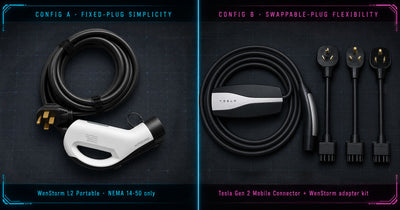
| Suitable, authorized NEMA 14-50 outlet on property (RV park, motel with an RV bay, some resort properties) — you have written property permission | Portable Level 2 charger with a fixed 14-50 plug |
| Suitable, authorized 120V outlet within safe cable reach of parking | Level 1 portable charger (the 32A Level 2 charger cannot use a 120V outlet) |
| Compatible Tesla AC destination charger for a J1772 vehicle — property confirms guest access is available, and any Tesla-account restriction is verified | Approved NACS-to-J1772 AC adapter (works with Tesla Wall and Destination Connectors for AC only — not Superchargers) |
| No confirmed outlet or Tesla AC destination charger | Nearby public DC fast charger or another Level 2 station reachable with your reserve range — plan the exact charger and route before you depart |
An adapter does not override a Tesla Wall Connector's access restrictions. Some Tesla-account-linked Wall Connectors at hotels only authorize sessions for guests registered through Tesla's system, or only for specific vehicle types. Confirm access with the property before you rely on this path.
When a portable charger belongs in your trunk
A portable Level 2 charger is worth carrying when:
- Your planned route depends on infrastructure at three or more hotel stops and you don't want a single broken charger to derail the trip.
- You know at least one stop has a confirmed, authorized 14-50 outlet you can use as a backup (RV-adjacent property, or a hotel that's confirmed permission by phone in advance).
- You've already installed and tested the charger at home so you know its cable length and connector type.
It's not worth carrying when your route only touches one or two hotels whose chargers are freshly confirmed on PlugShare and by phone, and there's a nearby DC fast charger for the fallback case.
The WenStorm Level 2 Portable Charger ($219.99) fits under the trunk floor of most sedans and SUVs. It plugs into a NEMA 14-50 receptacle only — not into dryer outlets, TT-30 pedestals, or 120V outlets. If your route needs coverage for TT-30 (RV park) or 120V outlets, see the Road-Trip Backup Kit guide for the multi-outlet-type scenario.
For readers weighing this against a wall-mounted home charger, see the WenStorm vs Emporia Pro comparison.
Frequently asked questions
Which hotel chains have the most reliable EV charging?
Chain-level statements are unreliable — charger status varies by property, not by brand. Marriott Bonvoy, Hilton Honors, and IHG all publish EV charging as an amenity at some percentage of locations, but the individual property's status is what matters. Check PlugShare recent-user reviews for the specific hotel, not the chain marketing page.
If my hotel's charger is Tesla Destination and I drive a J1772 EV, can I use it?
Sometimes. Tesla Destination Chargers are AC Level 2 units (not Superchargers). Some Destination Chargers were installed with a J1772 adapter attached; many were not. Some are software-restricted to Tesla vehicles or specific guest accounts. Verify with the property AND check PlugShare's connector-type field before booking. If the answer isn't a clear yes, plan a public-charging backup.
Can I use my home charging network's app at a public charger?
Depends on the network. Some networks (like ChargePoint) let one account manage home and public chargers together. Others treat home and commercial products as separate systems requiring separate apps. Check your specific app's coverage before your trip.
How do I dispute a fee that showed up unexpectedly?
Contact the charging network's support with your session ID (in the app history), the exact plug-in and unplug times, and any photos of the charger's pricing screen at the time. Refund policies vary — some networks refund contested first-time charges as a courtesy, others don't. There is no universal deadline; ask the specific network what their process is.
Should I charge to 100% at a hotel to avoid a mid-trip stop?
Not automatically. Charging to 100% is slower per added mile than charging to 80–90%, and it accumulates idle-fee risk if you don't unplug promptly. Set your target to whatever your next leg actually needs plus a reserve, and set an app notification at that limit so you know when to unplug.
What if my car gets locked to the charger and won't release the connector?
Some vehicles software-lock the charging port during a session and require the vehicle app (or a key press) to release it. If the app isn't responding and the car's release doesn't work, try the manual release on your vehicle — location varies by model, usually near the charge port door or in the trunk. If the car still won't release, call the vehicle manufacturer's roadside assistance. This is a real failure mode reported in EV owner communities and is separate from any hotel charger's condition.
Is it safe to leave my car plugged in overnight?
Physically safe if the charger passed the visual inspection and delivers rated Level 2 (240V AC) power. Financially costly if the station has idle fees after your session completes. Set the car's app to notify you at your chosen charge limit so you can unplug before idle fees start.
What should I do if the charger stops mid-session?
Try restarting the session in the app first. If that fails, unplug and visually inspect the connector before assuming it's the charger's fault. Call the network's phone support if the app can't restart the session. If you have a confirmed backup outlet with property permission, the portable-charger fallback is next.
About this guide + sources
This guide draws on user-reported experience from public EV charging communities and the published policies of the major U.S. EV charging networks. Individual station rates, access rules, and refund policies are set by the station owner and vary widely — the article describes categories of fee and access to check for, not a universal fee schedule. It has not been reviewed by a licensed electrician prior to publication.
Named references:
- PlugShare — user-reported charger status database (plugshare.com)
- ChargePoint — chargepoint.com/drivers
- EVgo — evgo.com/pricing
- Tesla Destination Charger network — tesla.com/findus
- NEC 625.42 (continuous load on EV supply equipment)
WenStorm sells the Level 2 Portable EV Charger discussed above. Charging network references (PlugShare, ChargePoint, EVgo, Tesla, Wallbox, Blink) are provided as third-party research sources; WenStorm has no commercial affiliation with any of those networks. The portable-charger backup workflow described above requires the property's explicit permission and a suitable, verified outlet; it is not a substitute for a working public destination charger.
Real questions from EV owners
Join the Road Trips & Backup Charging discussion →